

The digital transformation era demands robust data protection solutions, especially for virtualized environments like Hyper-V. AOMEI Cyber Backup emerges as a reliable tool, providing efficient and comprehensive backup solutions for Hyper-V VMs.
Importance of Hyper-V VM Backup
Virtualization offers numerous benefits, including improved resource utilization and cost savings. However, it also introduces new challenges, particularly in data protection. Hyper-V VMs can host critical applications and data, making them essential to business operations. Any disruption or data loss can lead to significant downtime and financial losses. Therefore, a robust backup strategy is imperative to ensure data availability and business continuity.
AOMEI Cyber Backup: The Solution for Business Continuity
AOMEI Cyber Backup is designed to meet the unique needs of Hyper-V environments. It offers a comprehensive set of features that simplify the Hyper-V VM backup while ensuring maximum data protection. The software supports both full and incremental backups, allowing businesses to choose the most suitable backup method based on their needs. Full backups provide complete copies of VMs, while incremental backups save only the changes since the last backup, optimizing storage usage.
Why Choose AOMEI Cyber Backup
Ease of Use: A user-friendly interface that simplifies the backup and recovery process, making it accessible even for those with limited technical expertise.
Comprehensive Backup Options: Support for full, incremental, and differential backups to cater to different backup needs and optimize storage usage.
Automated Backup Schedules: The ability to set up automated backup schedules to ensure regular backups without manual intervention.
Fast Recovery: Quickly restore VMs in case of data loss or corruption.
Centralized Management: A centralized console to manage all backup tasks and settings, simplifying administration and monitoring.
Scalability: Ability to scale with growing IT environments, supporting large numbers of VMs and extensive data volumes.
How to Configure Automated Hyper-V VM Backup
Automated backup schedules are crucial for ensuring regular backups without manual intervention. AOMEI Cyber Backup allows users to configure backup schedules based on their specific requirements. Here’s how to set up an automated Hyper-V backup:
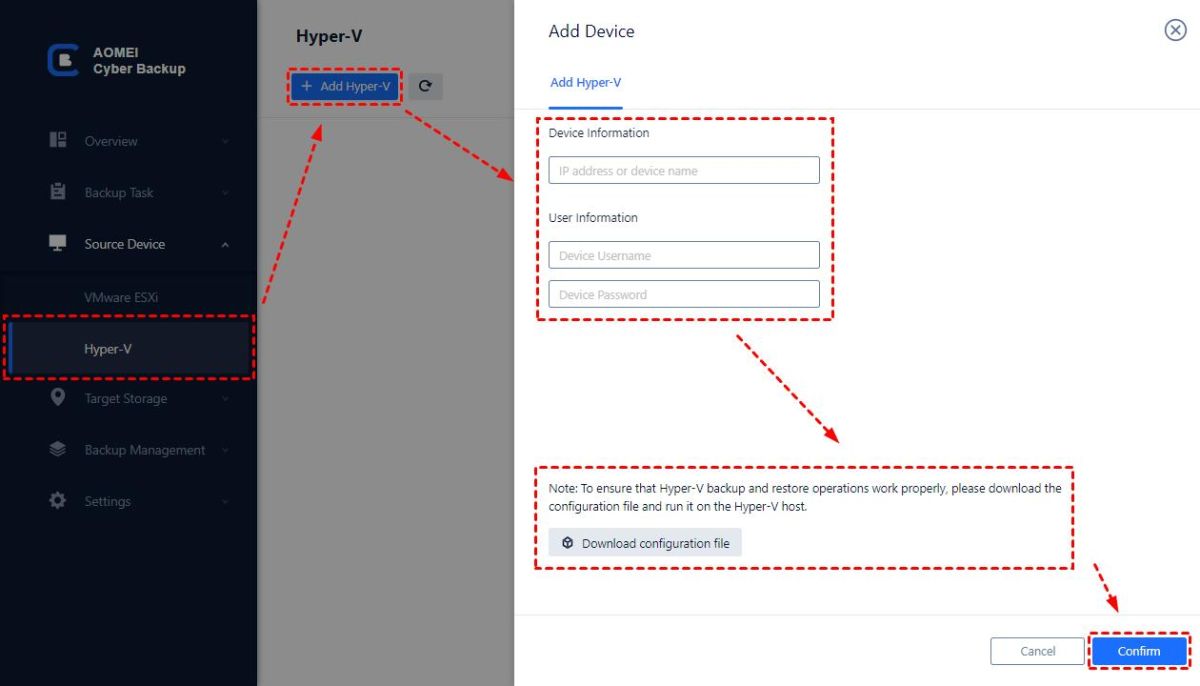
Step 1. Bind Devices
Go to the AOMEI Cyber Backup. Click Bind Device to add your Hyper-V host by entering authentication.

Step 2. Create Backup Task
Select Backup Task > + Create New Task. Here, you can adjust the Task Name, Backup Type, Device, Target, and Schedule.
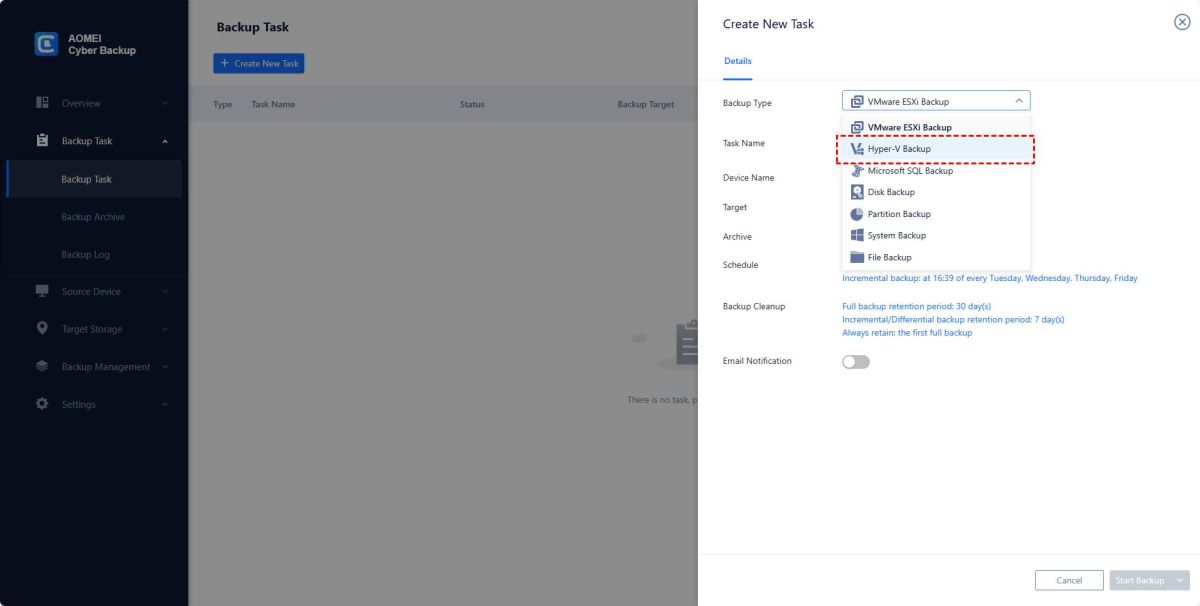
- Device: Choose which virtual machines on the Hyper-V host to backup all at once.
- Target: You have the option of backing up to a network path or a local path. Favorite Storage will hold used pathways for easy access.
- Schedule: Depending on the frequency you designate, you may automate the daily, weekly, or monthly execution of full or incremental backups.
- Archive: You can activate the archive feature and add an AWS S3 storage. Next, the S3 storage will receive these backup files.
- Define retention policies to manage backup versions and optimize storage usage.
- Receive email notifications about backup status and alerts.
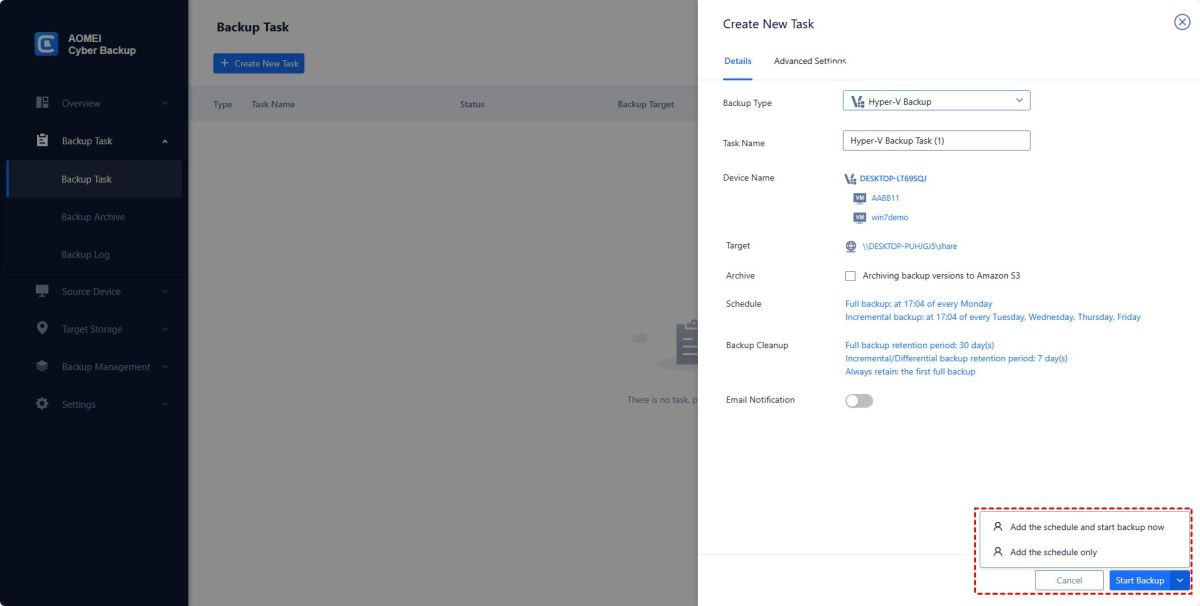
Step 3. Start Backup
Save the settings and activate the backup schedule to ensure automated backups.
✨These features ensure that backup processes are efficient and reliable. With AOMEI Cyber Backup, businesses can ensure their Hyper-V VMs are protected against data loss and downtime, maintaining data integrity and business continuity.
FAQ about Hyper-V VM backup using AOMEI Cyber Backup
Q: Can AOMEI Cyber Backup restore Hyper-V VMs to hosts or other storage devices?
Yes. AOMEI Cyber Backup has a cloning feature that allows you to recover Hyper-V VMs to hosts or other storage devices. This feature is useful for migration, simulation, or duplication of complex VMs.
Q: Can I use the Hyper-V checkpoints instead of backups?
Although Hyper-V scans are useful, these scans should not be considered instead of regular backups. The scans will record the status of the VM at a specified time point, but may adversely affect performance if kept too long. It is best suited for short-term reversals before major changes. Rather than being used for long-term data protection.
Conclusion
AOMEI Cyber Backup not only simplifies the backup process but also enhances data security and operational efficiency. By leveraging its advanced features, businesses can maintain uninterrupted operations and protect critical assets effectively. With AOMEI Cyber Backup, organizations can confidently secure their Hyper-V VMs, ensuring data availability and business continuity.

Bhupendra Singh Chundawat is a seasoned technology journalist with over 22 years of experience in the media industry. He specializes in covering the global technology landscape, with a deep focus on manufacturing trends and the geopolitical impact on tech companies. Currently serving as the Editor at Udaipur Kiran, his insights are shaped by decades of hands-on reporting and editorial leadership in the fast-evolving world of technology.