

Microsoft announced on Wednesday that it would include features from the Xbox Game Pass app into the Xbox app on mobile platforms this week. The new streamlined version of the Xbox app, complete with Game Pass features, will be accessible on iOS, Android, and iPadOS. Meanwhile, downloads of the Xbox Game Pass app will cease in November. Besides that, the company said it has a few other Xbox-related features for PC and consoles-including Game Bar Compact Mode and improvements to the Xbox app on PC.

Xbox App to Get Game Pass Features
Features of the Xbox Game Pass app will be merged into the Xbox app as an update that would be available to Xbox beta members on mobile this week. The new all-in-one Xbox app would soon be coming to everyone. As of November, Microsoft would stop supporting any new downloads of the Xbox Game Pass app.
You will be able to browse the entire Game Pass catalog to find your favorite games and be up-to-date on the latest new games coming to the service, the company said in a Wednesday post on Xbox Wire. Other features that are expected to be released in the Xbox app include more games in Microsoft’s game subscription service, as well as management of memberships. Game Pass Ultimate subscribers will also see their rewards and redeem them and stream some games on iOS or Android, directly with Xbox Cloud Gaming.
All other functionalities of the Xbox app will be identical for everyone that includes social features of the Xbox app, its game update, party chat, achievement status checkup, or remotely installing games available on your console.
Xbox Live now available on PC
In fact, according to the information from Microsoft’s September update, Game Bar Compact Mode was now available to all PC players, marking the first time that this mode was announced for this particular audience in August. It initially became available to Xbox Insiders in a way that optimizes the Xbox Game Bar to fit smaller screens and Windows-based gaming handhelds.
Game Bar Game Bar gives Windows users a glimpse into what’s playing, access to a launchers section, and captures gameplay footage and more. The Compact Mode has simplified the access to widgets of Game Bar on smaller screens. A feature introduced in Game Bar Compact Mode is now quit a game directly from Home widget. To enable Game Bar Compact Mode, go to Game Bar Settings and toggle the Compact Mode switch on in the General tab.
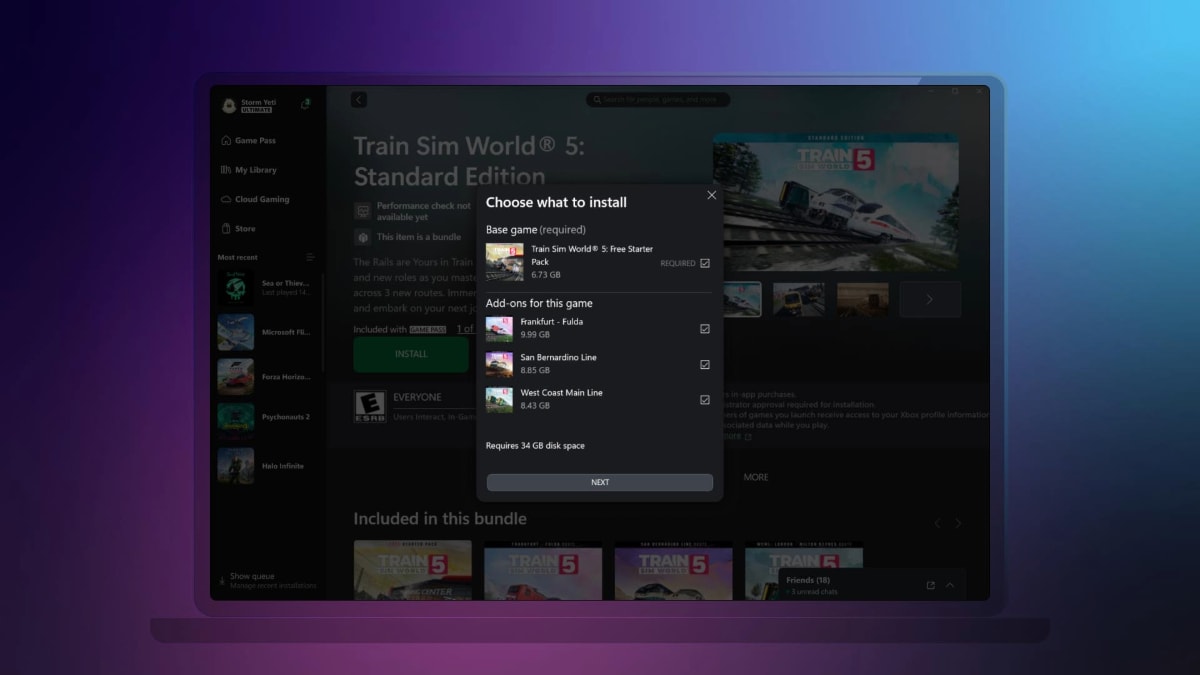
Users can see and manage add-ons in one place
As part of the same update, Xbox parent also rolled out a refresh for the Xbox app on PC, which improves the game management experience on the app. Users can now view and install related add-ons for a game while installing that title instead of looking around for available add-ons on the app. Users can also manage add-ons or additional content for a game by right-clicking on an installed title, then choosing “Manage” and heading to the “Add-ons” section.
Better Game Management on Xbox Devices
You can now pre-download game updates on Xbox, meaning you can get started as soon as the update goes live. For how to do this, see below and go to My Games & Apps, select Manage, and choose Updates. Here you’ll find all the pre-downloads for your games. Capability to be available on select titles at launch, and more titles later. Last but not least, users of Xbox will be notified of the readiness of a wish-listed game, when it is coming onto Game Pass, or whether it is featured in a Free Play Day promotion.

Bhupendra Singh Chundawat is a seasoned technology journalist with over 22 years of experience in the media industry. He specializes in covering the global technology landscape, with a deep focus on manufacturing trends and the geopolitical impact on tech companies. Currently serving as the Editor at Udaipur Kiran, his insights are shaped by decades of hands-on reporting and editorial leadership in the fast-evolving world of technology.